It's 2026, and Obsidian's Avowed has been out for over a year now. I still remember the buzz when it launched — this was supposed to be the RPG to bring back that Pillars of Eternity magic in a first-person, big-budget package. And you know what? For the most part, they nailed it. The world is lush, the combat feels punchy, and the story ... oh man, it's a slow burn that really pays off. But let me tell you, not everything was sunshine and rainbows.
From day one, PC players ran headfirst into a wall of technical hiccups. Framerate drops in the middle of a tense fight? Check. Shader compilation stutters that made you feel like your character was tripping over invisible rocks? Double-check. Even after a year's worth of patches, some of those gremlins still lurk under the hood. I was pulling my hair out until I discovered a carefully tuned set of graphics options that transformed my playthrough from a stuttering mess into a buttery smooth adventure.
Sit tight, I've got you covered. After hours of tinkering, swapping settings on and off, and staring at frametime graphs until my eyes crossed, I stumbled on the magic combo that gives you a massive performance boost without turning the Living Lands into a muddy painting.
Graphics Settings: Squeezing Every Frame
First off, head straight to the Advanced Graphics Settings. This is where the real surgery happens. The default Epic preset is a performance hog, and honestly, some of those ultra-quality sliders barely move the visual needle. The twin culprits are Shadow Quality and Global Illumination Quality. Cranking both to Epic will make your GPU sweat bullets for almost no discernible improvement — the shadows are a microscopic bit sharper, and the indirect lighting is a touch more accurate, but in motion? You'll never notice. Drop them to High and watch your framerate soar. I'm talking double-digit gains in dense forest areas.
Oh, and if you're into eye candy like ray tracing — turn it off. I know, I know, it's heresy. But in Avowed, ray tracing is an experimental afterthought that tanks performance with frequent stutters. The game's screen-space reflections and baked lighting already look gorgeous, so you aren't missing much. Upscaling is your other best friend. Whether you're Team DLSS, FSR, or XeSS, enable it. I used DLSS Quality mode on an RTX 4070 and got a locked 60 fps at 1440p, something that seemed impossible at launch.
Now, a quick word on Texture Quality. This one is all about your VRAM headroom. Leave it on High if you have 8GB or more — reducing it makes outfits and terrain look like they belong in an early Xbox One game, and nobody wants that fuzzy mess. Only dial it back if you're constantly bumping into a VRAM wall (afterburner overlay is your truth-teller here).
Reflections and Effects Quality are sneaky performance eaters too. During chaotic spell-slinging battles, particle effects can choke even a mid-range rig. I set Reflections to Medium (the water still looks wet, I promise) and Effects to High. For everything else — View Distance, Post Processing, Foliage — leave them at Epic. Those settings contribute so much to the game's jaw-dropping scale and color, and they hardly cost any frames once the big hitters are under control.
Here's the neat summary I scribbled down after my testing:
-
Shadow Quality: High
-
Global Illumination Quality: High
-
Ray Tracing: Off
-
Upscaling: On, Quality mode
-
Texture Quality: High (or as VRAM permits)
-
Reflections: Medium
-
Effects Quality: High
-
All others: Epic
You might be thinking, "Wait, is that it?" And honestly? Yeah. That tiny collection of tweaks took my framerate from a queasy 35-45 fps to a smooth 75-90, and I could finally enjoy the game without gritting my teeth every time I turned the camera.
Camera Tweaks: Comfort First
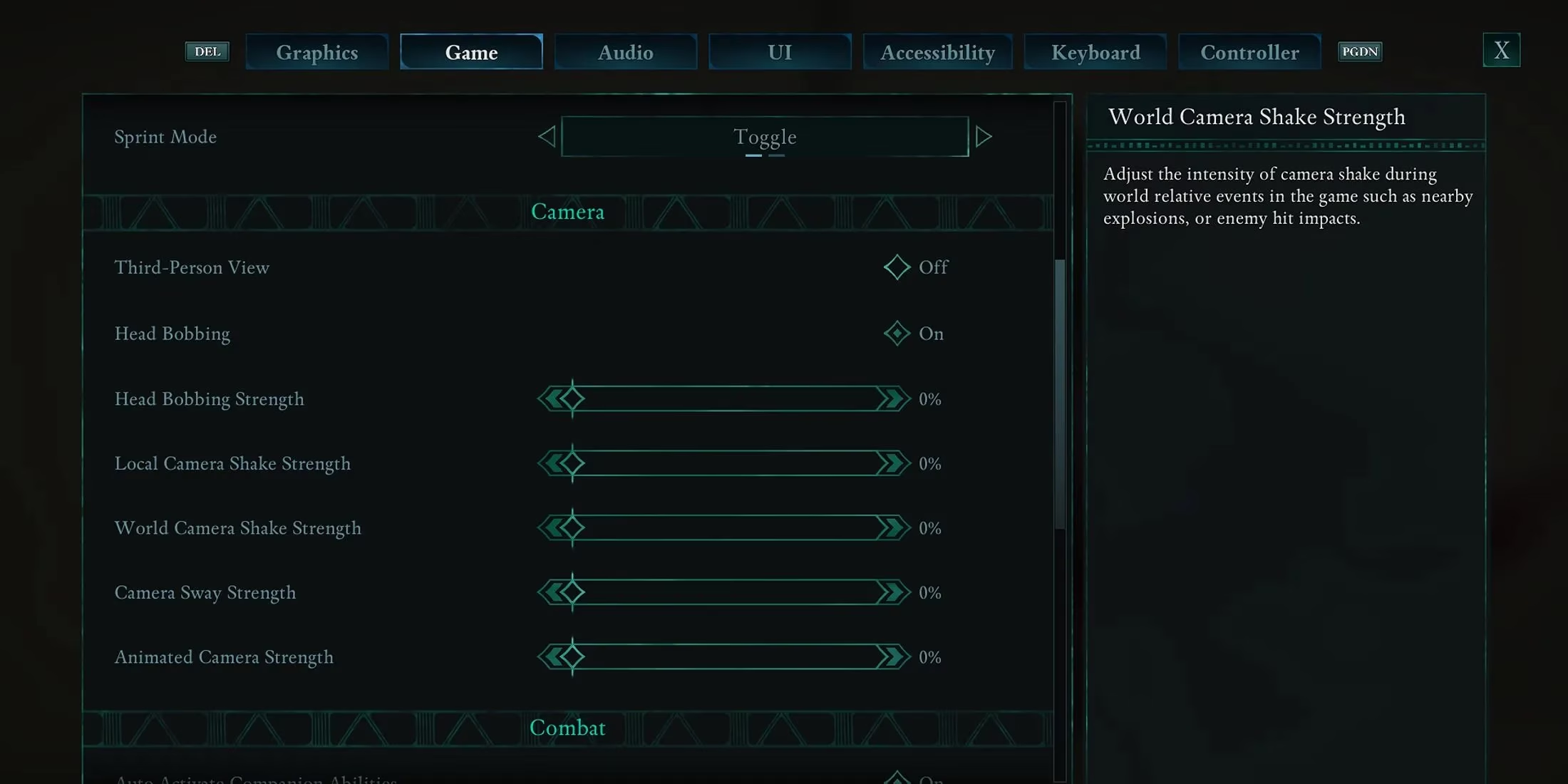
But hold on — there's more. Even with perfect frame pacing, Avowed can physically wear you out. The default camera behavior is ... aggressive. Head bobbing, screen shake, and a swaying effect that mimics an over-caffeinated documentary crew. It gave me a mild headache within thirty minutes. So after some digging in the Game tab (right next to Graphics), I found a section called Camera that was a godsend.
Here, you can neuter all that artificial motion. I zeroed out everything and the relief was immediate. No more feeling like I was on a boat during dialogues, no more vibration when a companion cast a fireball nearby. It's a small change that lets the art direction shine without your stomach turning somersaults.
My personal anti-nausea prescription:
-
Head Bobbing: Off
-
Head Bobbing Strength: 0
-
Local Camera Shake Strength: 0
-
World Camera Shake Strength: 0
-
Camera Sway Strength: 0
-
Animated Camera Strength: 0
I was skeptical that flicking a few toggles would make such a difference, but boy, did it. Suddenly, I could play for hours without needing a lie-down. It’s like the difference between reading a book in a moving car and on a steady couch.
So, does Avowed still have rough edges in 2026? Yeah, it does. Obsidian built an incredible world but fumbled the technical polish a bit. The good news is that with a few careful choices — the ones I just walked you through — you can sidestep most of the heartache. I went from nearly refunding the game to losing entire weekends in Eora’s wild frontier. Trust me, give these settings a shot; they’re the closest thing to a magic wand we’ve got. And if you stumble on your own tweaks, the community is still buzzing over on forums, swapping findings like old war stories. Happy adventuring, fellow envoy.
As you dive into the world of Avowed, it’s worth ensuring you get the best deal on the game itself. Whether you’re upgrading your library or hunting for expansions, finding a good price can make the experience even sweeter. There are platforms dedicated to tracking discounts and bundles, helping gamers save without compromising on quality.
One such resource is DealNest, where you can check game prices across various retailers. It’s a handy tool for staying updated on deals, ensuring you spend more time exploring Eora and less time worrying about your budget. After all, every adventurer deserves a good bargain. Happy gaming!